


Six Common Connector Types Used In Medical Devices
Do you ever wonder what separates a life-saving device from a simple tool? It often comes down to one single, tiny component: the connector. While a faulty connector might be a minor headache for consumer electronics, it can have severe consequences in medical applications. We believe you should know exactly what you’re putting your trust in.
We'll solve this problem for you. This article provides a breakdown of the most common connector types, helping you recognize the right fit for the job.
Push-pull Connectors
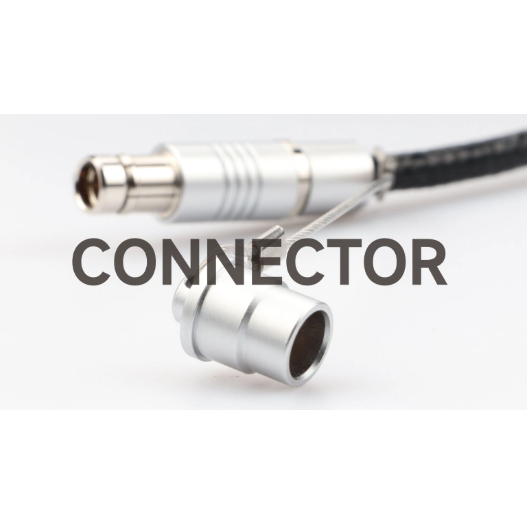
Push pull connectors are a go-to choice when you need a fast, secure connection. You simply push the plug into the socket, and it locks with an audible click. To disconnect, you pull back on the outer sleeve. It’s a very simple design, but that simple action gives you a strong, dependable physical lock.
We see these connectors everywhere, from patient monitors to catheter systems and even surgical equipment. A defibrillator, for instance, needs a connection that won't give out in an emergency. The instant, firm lock a push-pull connector provides is a major source of confidence for the user.
When you're choosing one, a few key factors matter most.
● Mating cycles are a critical specification. Think about how many times a cable will be connected and disconnected. We should pick a part that can handle that kind of repeated use over its lifespan.
● Sterilization is just as important. Can the connector survive an autoclave or chemical sterilization without breaking down? The materials used in the housing and contacts must be up to the task.
● Always consider signal integrity. These connectors often carry sensitive data from medical sensors. They need proper shielding to prevent electromagnetic interference from distorting your readings.
Circular Connectors
You’ve seen circular connectors everywhere, and for good reason. They are the workhorses of the connector world. Their simple, round shape makes them incredibly versatile. They often have a threaded coupling that you screw on, creating a secure, sealed connection.
We use circular connectors when durability and reliability are non-negotiable. They’re common on everything from patient monitors to surgical hand tools. Their design helps protect against both physical impact and environmental hazards. They can be dropped, dragged, and still keep a solid connection.
When you're choosing a circular connector, here's what to keep in mind.
● Check the IP rating. This rating tells you how well the push pull circular connectors resist dust and liquids. For medical devices that need frequent cleaning, an IP67 or IP68 rating means they can survive being submerged in water. That’s a big deal.
● Consider the locking mechanism. Threaded couplings give you the tightest, most secure seal. Bayonet couplings, with their quick twist-and-lock action, are a good compromise when you need speed along with security.
● Look at the pin count. The circular design allows for a high pin density. This lets you fit a lot of signal and power lines into a small footprint, keeping your device compact.
D-Sub Connectors
You’ve likely seen a D-sub connector before, even if you didn't know its name. Their distinct, D-shaped metal shell makes them easy to spot. This classic connector has been around for decades. It's a true workhorse, and we find it in countless medical devices.
We use D-subs most often for serial and parallel data communication. A vital sign monitor or an EEG machine might use them to transmit dozens of low-power signals at once. Their standardized design and well-known reliability make them a simple, trusted choice for many systems.
Still, they have a major limitation. D-sub connectors are not sealed. This means they won't protect your device from liquid spills or frequent cleaning. Because of this, we only see them in applications where the electrical connector is safe from environmental exposure. They’re great for connecting a device to a cart, but not for something you'd use in a wet surgical field.
When you're choosing a D-sub, here's how to do it right.
● The shell size and pin count matter. A 9-pin connector is great for simple serial data. But you may need a 15-pin or even a 25-pin for more complex signal requirements. Choose what fits your needs.
● Look for locking thumbscrews. These simple additions prevent accidental disconnection. A quick twist keeps the connector firmly in place.
● Consider gold-plated contacts. Gold helps prevent corrosion, giving you a more reliable connection and a longer lifespan. This is especially important for devices that need to work without fail for many years.
Card-Edge Connectors
You’ve probably used a card-edge connector without even realizing it. They are the same type of connector you find in a computer's memory slot. They work by using a slot or receptacle with spring-loaded contacts. The edge of a printed circuit board (PCB) slides in, and the contacts on the connector make a solid electrical connection with the pads on the board.
We use these connectors to create modular medical systems. Think about a patient monitoring device. You might want to swap out a module for ECG, SpO2, or blood pressure. Card-edge connectors make this possible. They allow you to add or remove different functions from a single base unit.
They are incredibly useful for this purpose, but they do have a downside. The contacts on the PCB are exposed. This means they are not sealed against fluids or dust. This vulnerability is why we only see them inside the device's housing, where they are protected. A loose connection or a dirty contact here can cause a reading to fail.
Here is some advice for using them well.
● Always choose a connector with a high insertion cycle rating if the module will be swapped out often. The gold-plated contacts on the board can wear out over time, leading to a bad connection.
● The PCB's edge contacts should be gold-plated. Gold offers better resistance to corrosion and wear compared to other finishes.
● The connector's housing is crucial. It needs to provide a secure fit to hold the PCB in place and protect the contacts from the environment.
Pogo Pins
Think of a pogo pin as a tiny, spring-loaded plunger. It gets its name because the pin moves up and down like a pogo stick. Unlike other electrical connectors, a pogo pin does not latch or screw into place. It makes a secure connection by pressing its tip against a flat contact pad on another surface. The spring inside provides the force needed to make a solid electrical connection.
We use these pins when a device needs to be connected and disconnected quickly and often. They’re a perfect solution for charging bases for portable medical devices, like wearable monitors or blood glucose meters. This design also helps us create a completely sealed housing on the device itself. You don't need to open a port, which keeps fluids out.
Their one big weakness is the lack of a mechanical lock. The connection relies only on pressure. This means a sharp bump or a small piece of debris can break the circuit. You have to design the housing carefully to hold the device in place and keep the contacts clean.
Here is some advice on how to get them right.
● The plating on both the pogo pin and the contact pad should be gold. This prevents corrosion and gives you a reliable connection over a long period.
● Consider the spring force. You need enough force to make a solid electrical contact, but not so much that it damages the mating pads. This balance is key.
● The housing design is everything. It must guide the device into a perfect alignment and hold it there firmly. Without good housing, pogo pins are not reliable.
USB Connectors
We all know the USB connector. It's the standard for data transfer and power. Using a familiar connector means you don't need a special cable. This convenience is a big plus, and it can also help keep costs down for certain devices.
We find these connectors on devices that need to share data with a computer. A portable diagnostic tool in a hospital or a lab analyzer, for example, might use a USB port to export test results. It's perfect for this kind of one-time data transfer or for updating the device's software.
But you have to be careful. USB is not a good choice for continuous monitoring or life-critical applications. There’s a risk of the cable being pulled out by accident. Standard USB ports also lack a seal, which makes them a contamination risk in a sterile environment. A major concern is patient electrical safety.
To use them correctly, we must follow strict safety protocols. Here is what you need to know.
● Your device must have galvanic isolation. This crucial component protects the patient from an electrical shock if the connected computer has a fault. This is required to meet the IEC 60601-1 safety standard.
● Never use them for life-sustaining tasks. Their purpose is for intermittent data. They are not a reliable connection for a constant flow of data from a patient.
● We recommend using USB-C. It provides a more robust physical connection, and its reversible design means you can't plug it in the wrong way.
Choosing Your Connector
We've covered six of the most common connector types used in medical devices. You see now that each one has a specific strength and weakness. The right choice depends on your application, the environment it will be used in, and the level of security and safety it requires. It's a decision we never take lightly.
Choosing a connector is about more than just a physical fit. It’s about ensuring patient safety and device reliability. The right connector will keep your device performing day after day, without fail.
If you have questions about your next project, MOCO Connectors can help. We have a wide range of products for your specific needs. Find your perfect solution at our website https://www.mococonnectors.com/.

Shenzhen MOCO Interconnect Co., Ltd.
Become a world-class industrial connector supplier & manufacturer in China, MOCO Connectors providing reliable and convenient connector solutions for global customers
PRODUCTS
QUICK LINKS
If you have any question, please contact MOCO connectors.
TEL: +86 -134 1096 6347
WhatsApp: 86-13686431391
EMAIL: eric@mocosz.com
2/F 1st Block,XinHao Industrial Park,N.O 21 XinWei Rd,XinZhuang Community,MaTian, GuangMing District,Shenzhen,P.R.C